Artificial intelligence can produce impressive answers, but the quality of those answers often depends on one surprisingly simple thing:
What you ask it to do.
Compare these two prompts:
Write something about saving money.
And:
Write a 500-word beginner-friendly guide explaining five realistic ways a college student can save $100 per month. Use practical examples and organize the article with short headings.
Both ask AI to write about saving money.
But the second prompt gives the AI much more information about the goal, audience, length, structure and expected result.
That’s the foundation of effective prompting.
You don’t need complicated commands or technical knowledge to write better AI prompts. In many cases, you simply need to communicate your goal clearly.
This guide explains how to write AI prompts that produce more useful results, with formulas and examples you can adapt for writing, research, studying, productivity and everyday tasks.
If you’re completely new to artificial intelligence, start with BriefTop’s beginner’s guide to using AI, which explains how AI assistants work and how to use them for common tasks.
What Is an AI Prompt?
A prompt is the instruction, question or information you provide to an artificial intelligence system.
A simple prompt could be:
Explain inflation.
A more detailed version could be:
Explain inflation to someone with no economics background. Use simple language, give one everyday example involving groceries and keep the explanation under 300 words.
The subject hasn’t changed.
The instructions have.
According to OpenAI’s prompt engineering guidance, prompts generally work better when they’re clear, specific and provide enough context for the model to understand what the user wants.
That’s the central principle behind almost everything we’re going to cover.
What Is Prompt Engineering?
You may have heard the term prompt engineering.
It sounds much more technical than it needs to be for ordinary AI users.
Prompt engineering simply refers to designing and improving instructions so an AI model produces a more useful response.
OpenAI defines it as the process of designing and optimizing prompts to guide a language model’s responses effectively.
For everyday tasks, you don’t need to become a professional prompt engineer.
You need to learn how to describe:
What you want.
Why you want it.
What information the AI needs.
What limitations matter.
How you want the answer presented.
Once you understand those elements, prompting becomes considerably easier.
The Simple AI Prompt Formula
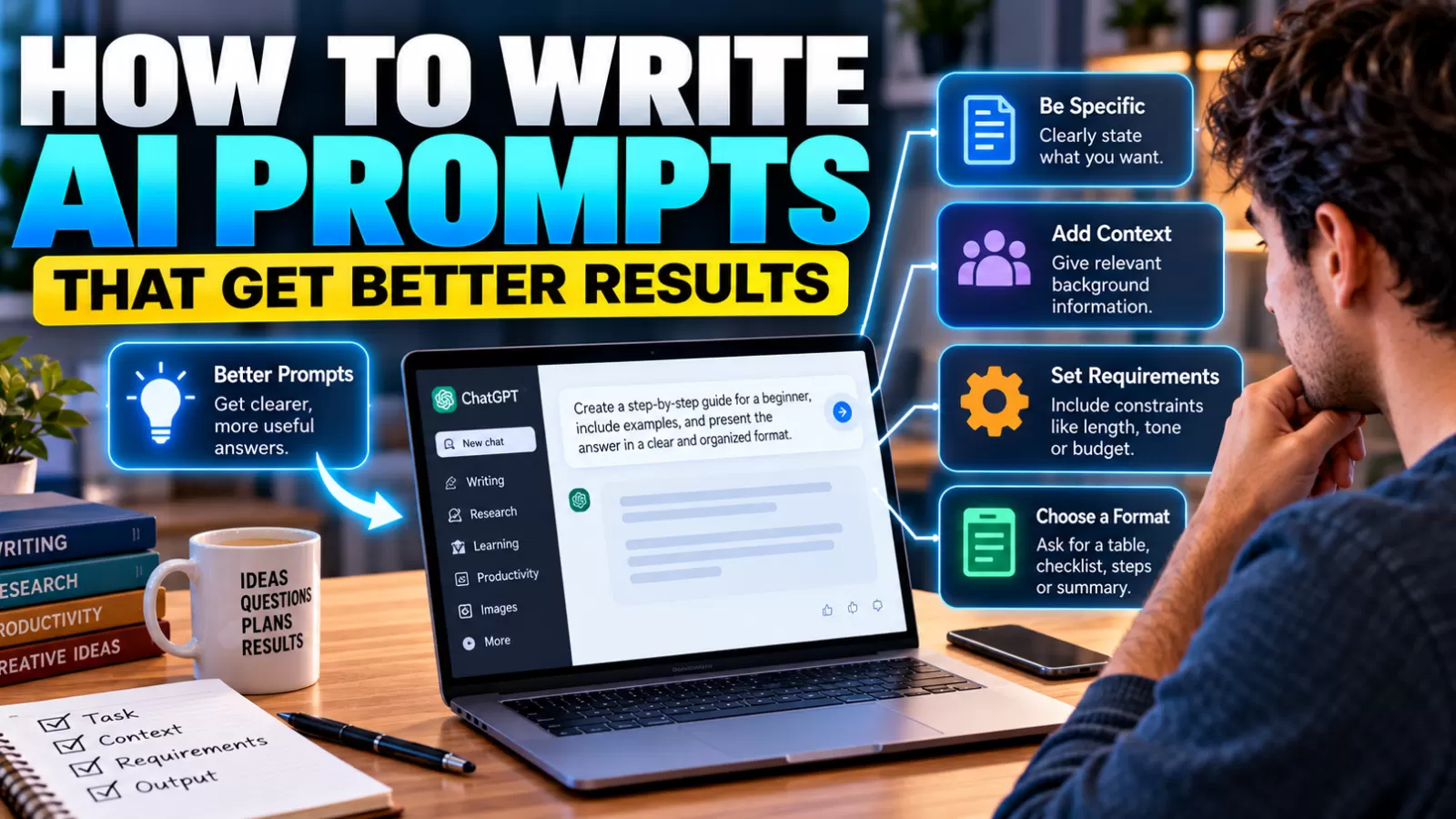
A useful formula for beginners is:
Task + Context + Requirements + Output
You won’t need every component in every prompt.
But this structure is a useful starting point when you’re not getting the result you want.
Let’s break it down.
1. Task
Tell the AI exactly what you want it to do.
Examples:
Summarize this article.
Create a workout plan.
Explain compound interest.
Rewrite this email.
Compare these two laptops.
The task should usually be immediately understandable.
2. Context
Provide information the AI needs to understand your situation.
Instead of:
Create a workout plan.
Try:
Create a workout plan for a beginner who exercises at home and has never followed a structured fitness program.
The context changes the response dramatically.
3. Requirements
Now add important constraints.
For example:
Create a workout plan for a beginner who exercises at home. Each workout should take no more than 30 minutes and require no gym equipment.
Now the AI knows what not to recommend.
Requirements can include:
Length.
Budget.
Time.
Reading level.
Available equipment.
Tone.
Audience.
Topics to include.
Topics to exclude.
4. Output Format
Finally, explain how you want the answer organized.
For example:
Present the plan as a seven-day table with columns for exercise, duration and rest time.
The AI no longer has to guess how you want the information presented.
Google’s current documentation similarly recommends giving AI systems clear, specific instructions and specifying constraints or formatting requirements for the desired output. Google Cloud’s prompt guidance provides examples of how more specific instructions can produce more structured results.
A Complete Prompt Example
Put the four pieces together:
Create a seven-day home workout plan for a complete beginner. I have 30 minutes per day and no exercise equipment. Focus on basic strength and mobility exercises. Include one rest day and present everything in a table with the exercise, sets, repetitions and approximate workout duration.
Notice that this prompt isn’t filled with technical terminology.
It’s simply clear.
That’s often enough.
Be Specific About What You Want
One of the most common prompting mistakes is being too vague.
Imagine asking:
Give me business ideas.
The AI could suggest almost anything.
Restaurants.
Software.
Clothing.
Consulting.
E-commerce.
Instead, try:
Give me 10 online business ideas that one person can start from home with less than $1,000. Prioritize businesses that don’t require inventory and explain each idea in two sentences.
Now you’ve dramatically narrowed the possibilities.
OpenAI’s current guidance recommends specifying relevant details such as context, desired outcome, length, format and style when those elements matter to the result. OpenAI’s guide to creating good prompts also recommends identifying the task clearly and providing necessary context.
Give AI the Right Context
Context is often more important than adding more words.
Suppose you ask:
Explain this contract.
The AI doesn’t know why you’re reading it.
A better prompt might be:
Explain this rental agreement in plain English for a first-time renter. Identify the sections dealing with deposits, late fees and cancellation. Don’t give legal advice; tell me which clauses I may want to ask the landlord or a qualified professional about.
Now the AI understands your purpose.
Context answers questions such as:
Who is this for?
What am I trying to accomplish?
What do I already know?
What limitations do I have?
What information matters most?
You don’t have to answer all of those questions every time.
Include only what’s relevant.
Tell AI Who the Audience Is
Audience can dramatically change a response.
Compare:
Explain black holes.
with:
Explain black holes to a 10-year-old.
and:
Explain black holes to a first-year university physics student.
All three prompts ask about the same topic.
But the vocabulary, assumptions and depth should be different.
This technique is especially useful when creating:
Educational content.
Presentations.
Emails.
Marketing materials.
Instructions.
Articles.
Reports.
You can specify audiences such as:
Beginners.
Experts.
Children.
Customers.
Managers.
Students.
General readers.
The more accurately the AI understands the intended reader, the easier it becomes to generate an appropriate response.
Specify the Tone When It Matters
AI can write the same information in very different styles.
For example:
Rewrite this email in a professional and friendly tone.
Or:
Make this explanation conversational but not humorous.
Or:
Rewrite this announcement in a concise, formal tone suitable for employees.
OpenAI specifically identifies tone as something users can communicate through descriptive terms such as professional, friendly, formal or informal in its prompt engineering best-practices guide.
Don’t overload the prompt with ten different style adjectives.
Usually two or three meaningful characteristics are enough.
Tell AI How Long the Answer Should Be
If length matters, say so.
Instead of:
Summarize this report.
Try:
Summarize this report in five bullet points.
Or:
Summarize this report in approximately 200 words for someone who hasn’t read it.
Or:
Give me a one-paragraph executive summary followed by five key findings.
Without a length instruction, the AI has to decide how much detail to provide.
Sometimes that’s fine.
But when you know what you need, tell it.
Ask for a Specific Format
Formatting instructions can turn an average AI answer into something immediately useful.
You can request:
Tables.
Bullet points.
Checklists.
FAQs.
Timelines.
Step-by-step instructions.
Headings.
Templates.
Comparisons.
For example:
Compare electric vehicles and gasoline cars in a table. Include purchase cost, maintenance, fueling, range and environmental considerations.
That’s more useful than simply asking:
Electric vs gas cars?
OpenAI’s API prompting guidance also recommends clearly describing the desired output format and, when appropriate, using examples to demonstrate what that output should look like. OpenAI’s prompt engineering guide provides several examples of this approach.
Use Examples When the Format Is Hard to Explain
Sometimes it’s easier to show AI what you want.
Imagine you want short product descriptions with a specific structure.
You could write:
Write descriptions using this structure:
Product: Wireless headphones
Description: Lightweight headphones designed for everyday listening, with a compact charging case and simple controls.Now create a description for: Portable Bluetooth speaker.
The example helps establish the expected pattern.
This technique is sometimes called few-shot prompting when multiple examples are supplied.
But don’t add examples simply because you’ve heard they’re useful.
If the task is already obvious, additional examples may be unnecessary.
Break Complex Tasks Into Smaller Steps
AI can handle complicated instructions, but sometimes a task becomes easier when you divide it.
Instead of:
Research electric vehicles, compare five models, calculate ownership costs, recommend the best one, write a report and create a presentation.
You might begin with:
Identify the five criteria that matter most when comparing electric vehicles for a family.
Then:
Using those criteria, create a comparison framework.
Then:
Apply the framework to these vehicles.
Then:
Turn the comparison into a concise report.
This allows you to inspect each stage before moving to the next.
OpenAI’s current guidance recommends breaking complex requests into smaller, focused prompts when doing so improves the workflow. OpenAI Help Center
Don’t Try to Write the “Perfect Prompt” Immediately
This is an important lesson for beginners.
You don’t need to spend ten minutes designing every prompt.
Start.
Look at the answer.
Then refine it.
For example:
Give me five dinner ideas using chicken.
AI responds.
Then:
Make them high-protein.
Then:
Remove recipes containing dairy.
Then:
Make number three suitable for meal prep.
This conversational approach is often easier than attempting to anticipate every requirement in the first message.
OpenAI describes prompting as an iterative process: start with an initial prompt, review the response and refine your instructions based on the result. OpenAI Help Center
Tell AI What Was Wrong With the Answer
When an AI response isn’t useful, don’t simply type:
Try again.
Explain the problem.
For example:
This is too technical. Rewrite it for a beginner.
Or:
These ideas require too much money. Keep the startup budget below $500.
Or:
The answer is too long. Keep only the five most important points.
Or:
You focused on features. I need the comparison to focus on long-term cost.
Specific feedback gives the model information it can use.
“Try again” doesn’t explain what needs improvement.
Ask for Multiple Options
Sometimes you don’t know exactly what you want until you see alternatives.
Instead of asking AI to produce one headline, try:
Give me 10 headline options. Make three straightforward, three curiosity-driven, three benefit-focused and one unexpected.
For an email:
Give me three versions: professional, friendly and very concise.
For a project:
Suggest three approaches and explain the advantages and disadvantages of each.
This gives you something to compare instead of forcing you to accept the first idea.
Use Constraints to Prevent Unwanted Results
Good prompting isn’t only about telling AI what to include.
Sometimes you need to tell it what to avoid.
For example:
Explain cryptocurrency to a beginner without using technical trading terminology.
Or:
Create five dinner ideas using these ingredients. Don’t include peanuts or shellfish.
Or:
Rewrite this paragraph in plain English without changing any numbers or dates.
Constraints reduce the number of assumptions the AI has to make.
Separate Instructions From Source Material
When you’re asking AI to work with a large block of text, make it clear which part contains your instructions and which part contains the material.
For example:
Summarize the following article in five bullet points. Preserve all numbers exactly.
ARTICLE:
[paste article here]
For more complex prompts, headings or delimiters can make the structure easier to understand.
OpenAI’s prompting guidance recommends placing instructions clearly and separating them from contextual text when appropriate. OpenAI Help Center
Ask AI to Work From Information You Provide
AI is particularly useful when you give it the source material yourself.
For example:
Using only the information in the document below, create a timeline of the events. If a date isn’t provided, mark it as unknown instead of guessing.
This instruction reduces the likelihood that the AI will fill gaps with outside assumptions.
You can also ask:
Which claims in this draft aren’t supported by the source material I provided?
That’s useful for editing and fact-checking workflows.
Don’t Assume a Better Prompt Makes AI Always Correct
Better prompting can improve relevance and usefulness.
It doesn’t eliminate AI mistakes.
An AI system can still:
Misinterpret information.
Use outdated knowledge.
Make incorrect calculations.
Misstate a source.
Invent details.
Confuse similar concepts.
A polished response can still be wrong.
For important information, verify claims using reliable sources.
This is particularly important for:
Medical information.
Legal questions.
Financial decisions.
Safety information.
Current events.
Academic research.
A good prompt improves communication with AI.
It doesn’t transform AI into an infallible source.
Ask for Sources When Researching
When you’re researching something factual, you can explicitly request sources.
For example:
Explain the current scientific consensus on this topic and provide primary or authoritative sources for the main claims.
Then open those sources yourself.
Don’t assume a citation is valid simply because the AI produced it.
For current information, it’s also useful to specify:
Search for current information and distinguish recent developments from historical background.
The verification step remains important.
Prompt AI to Identify Uncertainty
Another useful technique is asking the model to distinguish certainty from uncertainty.
For example:
Which parts of this answer are well established, and which parts should I verify?
Or:
Identify assumptions you’re making because my prompt doesn’t provide enough information.
Or:
If the information isn’t available, say you don’t know instead of guessing.
This can make an AI-assisted research process more transparent.
It still doesn’t guarantee accuracy, but it gives you a better framework for evaluating the response.
10 Before-and-After AI Prompt Examples
Here are practical examples you can adapt.
1. Writing an Email
Weak:
Write an email.
Better:
Write a professional but friendly email to a client thanking them for today’s meeting. Mention that I’ll send the updated proposal by Friday. Keep it under 120 words and provide a subject line.
2. Learning
Weak:
Teach me Excel.
Better:
Create a four-week Excel learning plan for a complete beginner who can study 30 minutes per day. Focus first on formulas, tables, sorting and basic charts.
3. Summarizing
Weak:
Summarize this.
Better:
Summarize the document below in five bullet points. Preserve important numbers and dates, then list any decisions or action items separately.
4. Brainstorming
Weak:
Give me YouTube ideas.
Better:
Give me 15 YouTube video ideas for a beginner cooking channel aimed at busy adults. Each idea should be possible to demonstrate in under 10 minutes.
5. Comparing Products
Weak:
Which laptop is better?
Better:
Compare these two laptops for video editing, portability and battery life. Use the specifications I provide and present the comparison in a table. Don’t assume specifications that aren’t listed.
6. Research
Weak:
Tell me about solar power.
Better:
Explain the main advantages and limitations of residential solar power for a homeowner. Separate established facts from factors that depend on location, electricity prices or local incentives.
7. Editing
Weak:
Make this better.
Better:
Rewrite the paragraph below to improve clarity and grammar while preserving the author’s meaning and conversational tone. Don’t add new factual claims.
8. Planning
Weak:
Plan my trip.
Better:
Create a three-day itinerary using the attractions listed below. Group nearby attractions together to reduce unnecessary travel and leave two hours of free time each afternoon.
9. Studying
Weak:
Help me study biology.
Better:
Quiz me on basic cell biology using 10 multiple-choice questions. Ask one question at a time, wait for my answer, then explain why the correct answer is right.
10. Decision Support
Weak:
What should I choose?
Better:
Compare these three options using cost, time commitment, flexibility and long-term benefits. Don’t choose for me; organize the tradeoffs so I can decide.
Notice the pattern.
The improved prompts aren’t better because they’re longer.
They’re better because they’re more informative.
A Reusable Prompt Template
Here’s a simple structure you can save:
Task: [What do you want the AI to do?]
Context: [What does the AI need to know?]
Requirements: [What must be included or avoided?]
Audience: [Who is the result for?]
Format: [How should the answer be organized?]
For example:
Task: Create a beginner guide to saving money.
Context: The reader has never created a budget.
Requirements: Include five practical steps and avoid complicated financial terminology.
Audience: Young adults starting their first full-time job.
Format: 800-word article with short headings and a checklist at the end.
You don’t have to literally include the labels every time.
They’re simply a useful reminder of the information AI may need.
Do AI Prompts Need to Be Long?
No.
A short prompt can be excellent.
For example:
Translate this paragraph into natural Spanish while preserving its informal tone.
That’s already specific enough for many situations.
Long prompts become useful when the task has more constraints.
Don’t add unnecessary instructions simply to make a prompt look sophisticated.
The goal isn’t length.
The goal is clarity.
Can You Use the Same Prompt With Different AI Tools?
Often, yes.
Principles such as clarity, context, constraints and output formatting apply broadly across modern generative AI systems.
However, different models can interpret the same instructions differently.
Some tools also have different capabilities.
One may browse the web.
Another may analyze files.
Another may generate images.
Another may specialize in coding.
Therefore, a prompt that works perfectly with one system may need adjustment for another.
The underlying communication principles remain useful.
Common AI Prompting Mistakes
Several mistakes appear repeatedly among beginners:
Being too vague.
The AI doesn’t know the details you haven’t provided.
Adding unnecessary complexity.
A giant prompt isn’t automatically a good prompt.
Giving contradictory instructions.
Don’t ask for something extremely detailed and extremely short without clarifying priorities.
Forgetting the audience.
An expert explanation and beginner explanation shouldn’t look the same.
Ignoring format.
Tell the AI when you need a table, checklist or specific structure.
Accepting the first response.
Refinement is part of effective prompting.
Assuming confidence equals accuracy.
Verify important factual claims.
The Best Prompt Is the One That Communicates Your Goal
There isn’t one magical prompt formula that works for every AI task.
Sometimes one sentence is enough.
Sometimes you need detailed context.
Sometimes an example is useful.
Sometimes the best approach is a series of short follow-up prompts.
What matters is whether the AI understands:
The task.
The context.
The constraints.
The desired result.
If those elements are clear, you’ve already solved most common prompting problems.
Final Thoughts
Learning how to write AI prompts doesn’t require memorizing hundreds of tricks.
Start by clearly stating what you want.
Add relevant context.
Define important constraints.
Specify your audience when it matters.
Ask for the output format you need.
Then look at the result and refine your instructions.
That last step is particularly important.
Prompting is a conversation, not a one-time command.
As AI systems continue becoming easier to use, the ability to clearly communicate goals may matter more than memorizing elaborate prompt formulas.
The best AI prompt isn’t necessarily the longest or most technical.
It’s the one that gives the system enough information to produce the result you actually need.